
How to Pay Korean National & Local Taxes Online and Download Tax Payment Certificates (2026 English Guide)
Living or working in South Korea means dealing with taxes sooner or later.

For English speakers, the biggest challenge isn’t the payment itself - it’s understanding where to go, what to click, and how to download official proof.
This post is a practical, 2026-updated English guide that explains how to pay Korean national and local taxes online and how to download official tax payment certificates using HOMETAX, SONTAX, and Government24.
Why Tax Payment Certificates Are Important in Korea
In Korea, simply paying your taxes is not always enough.
You are often asked to submit an official document proving that your taxes were fully paid.
These tax payment certificates are commonly required for:
- Visa renewal and immigration procedures
- Bank loans and financial applications
- Business registration or contracts
- Government and local authority services
National taxes and local taxes are handled by different systems.
Knowing which platform to use will save you time and prevent unnecessary mistakes.
How to Pay National Taxes Online (HOMETAX / SONTAX)
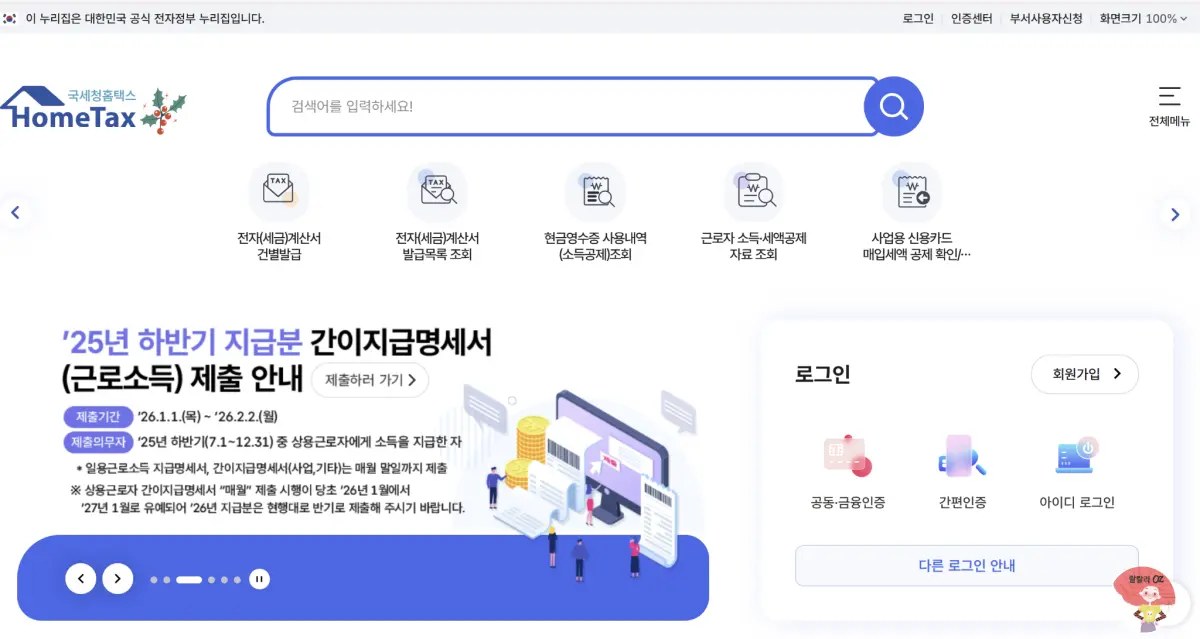
National taxes in South Korea are managed by the National Tax Service through:
- HOMETAX – desktop website
- SONTAX – mobile application
These platforms are used to pay income tax, VAT, corporate tax, and other national taxes.
Basic steps:
- Access https://www.hometax.go.kr
- Log in using Korean authentication (bank login or digital certificate)
- Check your tax bill under tax inquiry or payment menu
- Complete online payment
- Move to the certificate menu to download proof of payment
SONTAX offers the same functions on mobile and is useful when you need quick access.
How to Pay Local Taxes Online (Government24 & Local e-Tax)
Local taxes are separate from national taxes and include resident tax, property tax, automobile tax, and acquisition tax.
You can pay local taxes online through:
- Government24 (Gov.kr) – official Korean government portal
- Local e-Tax systems such as Seoul eTax or Wetax
On Government24, you can both pay local taxes and request official local tax payment certificates.
After logging in, search for services related to local tax payment or “local tax payment certificate” and follow the guided steps.
How to Download Tax Payment Certificates (National & Local)
Once your tax payment is completed, you can immediately request an official certificate.
In Korean systems, this document may be listed as:
- Tax Payment Certificate
- Certificate of Full Tax Payment
General process:
- Log in to the same platform where you paid the tax
- Go to the civil service or certificate menu
- Select the appropriate tax certificate
- Download the document as a PDF file
These PDFs are legally valid and accepted by banks, immigration offices, and government agencies.
Practical Tips for English Users
Most Korean tax platforms are still Korean-only.
However, English users can complete all steps successfully using the methods below.
- Use browser auto-translation (Google Chrome recommended)
- Follow the common menu flow: Login → Certificates → Tax Payment Certificate → PDF download
- Prepare your digital certificate or bank authentication in advance
Once you understand the structure, future tax payments become much easier.
Helpful English Video Guide (Recommended)
There is no official English-only government video for tax payment certificates.
However, the video below clearly demonstrates how to log in to HOMETAX and download tax documents — the same steps used for payment certificates.
Recommended placement: Insert this video after the certificate download section.
👇This English-subtitled video explains how to log in to Korea’s official tax system and download tax documents.
The document download process is identical for tax payment certificates.
Conclusion: A Simple Way to Handle Korean Taxes in 2026
Handling taxes in Korea does not have to be overwhelming — even for English speakers.
By using:
- HOMETAX or SONTAX for national taxes
- Government24 or local e-Tax portals for local taxes
- Browser translation and English video guides
You can complete tax payment and certificate issuance entirely online.
Always download and store your tax payment certificates.
They are often requested again, and having them ready will save you time later.
🌈How to Get Health Insurance in Korea as a Foreigner (2025 Guide)
How to Get Health Insurance in Korea as a Foreigner (2025 Guide)
Planning to live in South Korea as a student, worker, or working holiday traveler?0ne of the first things you need to understand is how health insurance works in Korea.This 2025 guide will walk you through the different types of insurance available and how
ozdorothyco.com
🌈How to Safely Use Public Wi-Fi in Korea
How to Safely Use Public Wi-Fi in Korea
Public Wi-Fi is everywhere in Korea—cafés, subways, libraries, even on the streets.It’s fast, convenient, and usually free.But before you tap “connect” to KT_WiFi or U+ zone, here’s what you need to know to stay safe online. 1. Not all Wi-Fi net
ozdorothyco.com
🌈Korea T-money Guide, How to Get Bus-to-Subway Transfer Discounts
Korea T-money Guide, How to Get Bus-to-Subway Transfer Discounts
Don’t overpay for short rides.Korea’s public transport system is fast, clean, and affordable - but only if you know how to use it right. One missed tap or late transfer can cost you double.The secret? A single T-money card and smart timing.This guide s
ozdorothyco.com
'일상 > 생활의 지혜' 카테고리의 다른 글
| Why is it Called 'Mocha'? The Surprising History of Coffee (0) | 2026.01.27 |
|---|---|
| 2026년 최신 건강정보, 2080 치약 일부 제품 트리클로산 검출, 회수·환불 방법 정리최신 (2) | 2026.01.21 |
| 마운자로 가격, 왜 이렇게 차이 날까? 현실 가격 & 저렴 구매 꿀팁 (0) | 2025.12.20 |
| 블로그 사진 몇 장 없을 때, 같은 사진을 안전하게 쓰는 법 (1) | 2025.12.15 |
| 난방비 폭탄 방지! '온돌 vs 실내' 똑똑한 보일러 작동법과 핵심 절약 팁 (1) | 2025.11.12 |


댓글